Overview
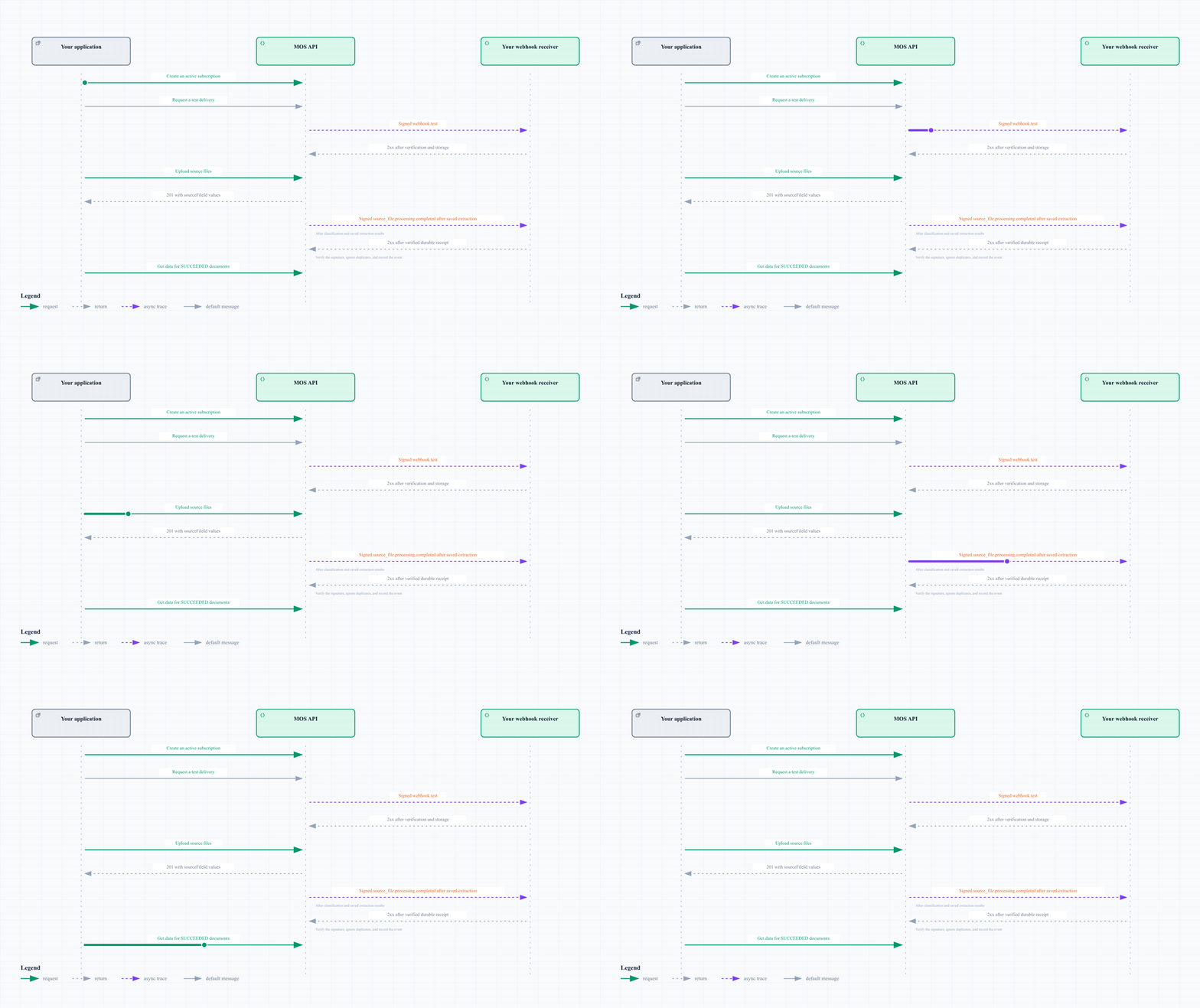
Use a webhook subscription to receive the processing result for each source file that you upload to MOS. MOS sends each event as a signed HTTP POST request to your application.
Source-file events give the result of processing through extraction. They do not show that human review or export to a loan origination system (LOS) is completed.
The diagram shows the request sequence:
Before you start
These items are necessary:
- An existing MOS loan ID and tenant ID.
- Your approved portal application’s API key and MOS service-account client secret.
- The API base URL for your environment, from the developer portal.
- The
integrations.manage permission for subscription operations.
- The
loan.view_all permission for loan data and completion manifests through machine-to-machine access.
- A public HTTPS endpoint that accepts POST requests and keeps the raw request body for signature verification.
- A random signing secret with a minimum of 32 characters, in secure storage for your receiver.
Before you start, make sure that your environment has source-file completion support. Your MOS integration contact can give this information. Use new uploads for the test. Files from previous uploads can have no source-file outcome.
The IDs in this guide are synthetic examples in the MOS ID format. Replace them with IDs from your tenant.
Set these variables with your environment values:
export MOS_BASE_URL='YOUR_API_BASE_URL'
export MOS_API_KEY='YOUR_API_KEY'
export MOS_CLIENT_SECRET='YOUR_CLIENT_SECRET'
export MOS_TENANT_ID='ujftdnvq6r8057p3i5g59tr3'
export MOS_LOAN_ID='tj0p8bzq0xqxwfbxxxx90je7'
MOS_BASE_URL is the full API base URL without a slash at the end. Keep its gateway prefix, such as /pm2m/api/v1.
1. Create the subscription before upload
Create one subscription for your tenant. It receives the selected event types for all loans in your tenant. Your receiver uses the event IDs and loan IDs to select the correct records.
Use these three event types for source-file outcomes:
| Event type |
Meaning |
Application step |
source_file.processing.completed |
The extraction and data writes necessary for this source revision succeeded. |
Get data for its documents with state SUCCEEDED. |
source_file.processing.failed |
Processing failed. Other documents can have state PENDING. |
Record the failure and its completion.reason. |
source_file.processing.skipped |
Extraction is not necessary for this source revision, for a reason such as a verified duplicate. |
Use your policy for completion.reason. |
A revision identifies one processing run for a source file. Reprocessing can create a higher revision.
Replace the example targetUrl with your receiver URL. Replace YOUR_SIGNING_SECRET with your secret text:
curl --fail-with-body --request POST \
  "$MOS_BASE_URL/webhooks/subscriptions/outbound" \
  --header "x-api-key: $MOS_API_KEY" \
  --header "x-tyk-mos-client-secret: $MOS_CLIENT_SECRET" \
  --header "tenant-id: $MOS_TENANT_ID" \
  --header 'Content-Type: application/json' \
  --data '{
    "name": "Loan processing outcomes",
    "targetUrl": "https://integration.example.com/webhooks/mos",
    "eventTypes": [
      "source_file.processing.completed",
      "source_file.processing.failed",
      "source_file.processing.skipped"
    ],
    "signingSecret": "YOUR_SIGNING_SECRET"
  }'
MOS returns HTTP 201. Record data.id as MOS_SUBSCRIPTION_ID. MOS does not return the signing secret.
The subscription must be active and include the event type when MOS records the outcome. A subscription receives no events for outcomes that MOS recorded before you created the subscription.
For document-level updates, you can also include classification.completed and extraction.completed in eventTypes at creation. The first reports a classified document. The second reports saved extraction results for one document. These events do not show source-file or loan completion.
2. Verify and test your receiver
Each delivery has these headers:
| Header |
Use |
x-mos-webhook-event-id |
Identify the event and ignore duplicate deliveries. |
x-mos-webhook-delivery-id |
Identify the delivery record for diagnostics. |
x-mos-webhook-event-type |
Identify the event type. |
x-mos-webhook-timestamp |
Read the signature timestamp as Unix time in seconds. |
x-mos-webhook-signature |
Verify the request signature. |
Configure your receiver in this order:
- Read the exact raw request body before JSON parsing.
- Reject missing or invalid signature headers.
- Apply a timestamp tolerance, for example five minutes, to limit replay of old requests.
- Calculate the signature with the secret text that you supplied at subscription creation.
- Compare signatures with a constant-time comparison.
- If verification fails, reject the request before you process its data.
- After verification, parse the JSON body.
- For source-file events, make sure that the header event ID matches the signed body
eventId.
- Validate the tenant ID against your subscription configuration.
- Record the event or place it in a durable queue before you return HTTP
2xx.
- Use
loanId and sourceFileId to select the matching upload records.
- For duplicate events, return HTTP
2xx without repeating the business action.
Use this signature format. hex means lowercase hexadecimal:
signedPayload = timestamp + "." + rawBody
signature = "sha256=" + hex(HMAC_SHA256(signingSecret, signedPayload))
Use the exact header timestamp. JSON parsing and serialization can change the signed bytes.
Use x-mos-webhook-event-id for duplicate detection for all event types. Source-file events also contain this ID in eventId. For webhook.test events, no loan update is necessary.
Set MOS_SUBSCRIPTION_ID to the ID from step 1. Send a test delivery:
export MOS_SUBSCRIPTION_ID='ftehxxaxde6wu72863cea23p'

curl --fail-with-body --request POST \
  "$MOS_BASE_URL/webhooks/subscriptions/outbound/$MOS_SUBSCRIPTION_ID/test" \
  --header "x-api-key: $MOS_API_KEY" \
  --header "x-tyk-mos-client-secret: $MOS_CLIENT_SECRET" \
  --header "tenant-id: $MOS_TENANT_ID"
HTTP 202 means MOS queued the test. Before you upload files, make sure that your receiver receives webhook.test, verifies its signature, and returns 2xx.
3. Upload the source files
Replace /path/to/loan-package.pdf with your file path. Upload the PDF with the multipart field files:
curl --fail-with-body --request POST \
  "$MOS_BASE_URL/loans/$MOS_LOAN_ID/source-files" \
  --header "x-api-key: $MOS_API_KEY" \
  --header "x-tyk-mos-client-secret: $MOS_CLIENT_SECRET" \
  --header "tenant-id: $MOS_TENANT_ID" \
  --form 'files=@/path/to/loan-package.pdf'
For each additional file, add another --form 'files=@/path/to/another-file.pdf' to the request.
MOS returns HTTP 201 with this response structure. The IDs are examples:
{
  "message": "Source files uploaded successfully",
  "results": [
    {
      "sourceFileId": "tdmrh68nhy50pn5p6e1jhpoc",
      "fileName": "loan-package.pdf",
      "message": "Uploaded successfully"
    }
  ]
}
Record every results[].sourceFileId with the loan ID. These IDs identify the source files that your application must monitor for this upload batch.
MOS can send an event before you record the upload response. Keep verified events until you can match their source-file IDs to the response.
4. Apply the outcome for each source file
A source_file.processing.completed event has this structure:
{
  "schemaVersion": 1,
  "eventId": "pend91d94npq90u4kw9ye7ok",
  "eventType": "source_file.processing.completed",
  "occurredAt": "2026-10-21T12:00:00.000Z",
  "tenantId": "ujftdnvq6r8057p3i5g59tr3",
  "loanId": "tj0p8bzq0xqxwfbxxxx90je7",
  "sourceFileId": "tdmrh68nhy50pn5p6e1jhpoc",
  "completion": {
    "revision": 1,
    "scope": "SOURCE_PROCESSING",
    "state": "SUCCEEDED",
    "membershipFinalized": true,
    "outcomeAt": "2026-10-21T12:00:00.000Z",
    "documentCounts": {
      "expected": 1,
      "pending": 0,
      "succeeded": 1,
      "failed": 0,
      "skipped": 0
    },
    "documents": [
      {
        "documentId": "uqg9nr6ahoe9hfz61s2v8sov",
        "documentVersion": 1,
        "taskId": "joa5mk3rvlu1t5dwpekrj5x2",
        "state": "SUCCEEDED"
      }
    ]
  }
}
Record the event ID and completion.revision for each source file. MOS can send duplicate events. The event sequence can differ from the processing sequence. Do not replace a higher revision with a previous revision in your application.
The diagram shows the action for each source-file outcome:
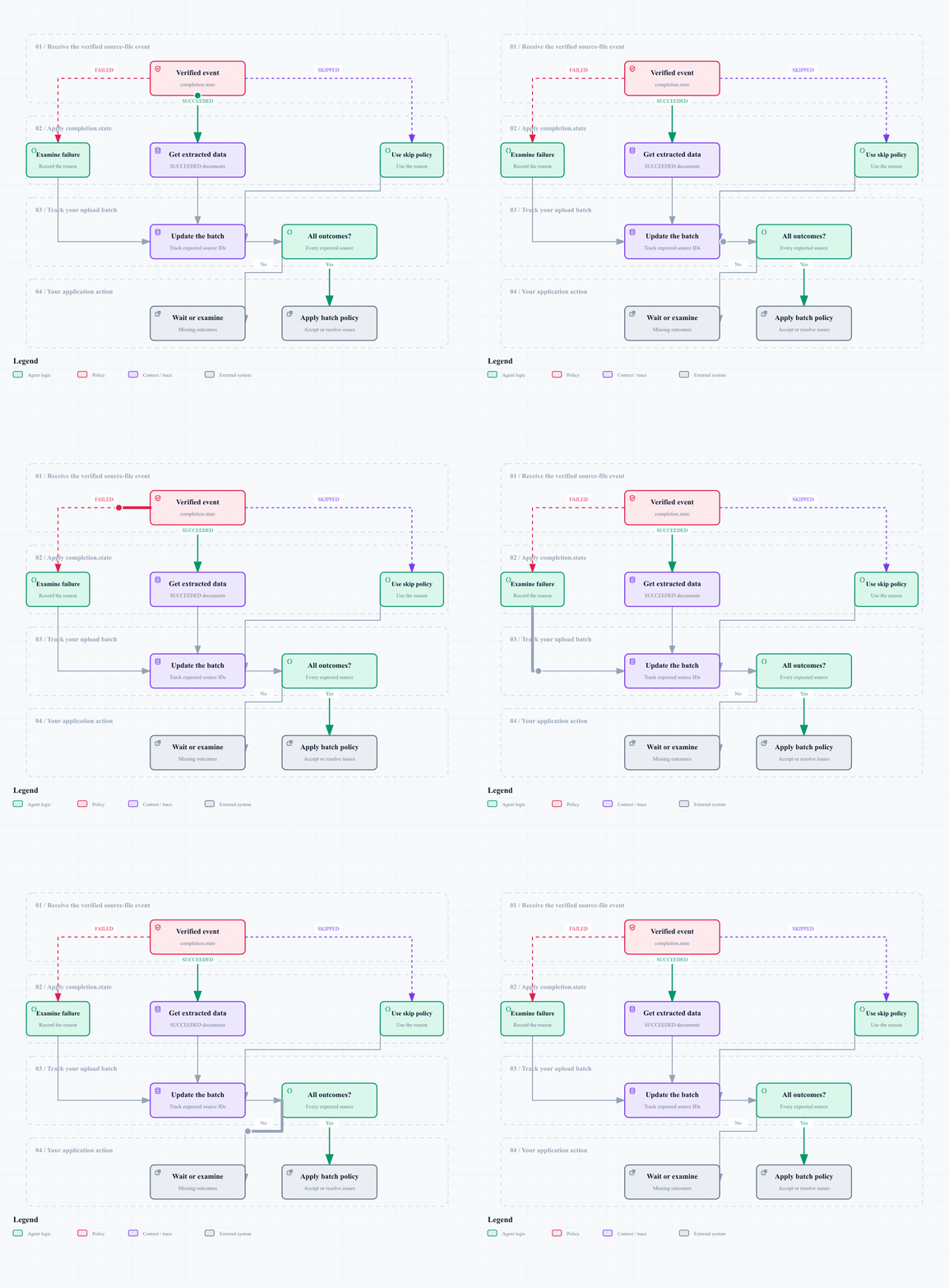
If membershipFinalized is false, MOS does not yet know all documents for this source file. In this case, documentCounts.expected is null. A failure can occur before MOS knows all source documents.
Accept the batch only when all expected source files have state SUCCEEDED or a skip that your policy accepts. New uploads add more source files to the loan. A source-file event does not close the loan.
For each document with state: "SUCCEEDED", use its documentId from completion.documents.
If completion.documents is null, first get the document list from completion.manifestRef. A manifest is the saved document list for that event. Make this request with the event IDs and your configured API base URL:
GET {MOS_BASE_URL}/tenant/{tenantId}/analytics/loans/{loanId}/source-files/{sourceFileId}/completion-events/{manifestRef.eventId}/manifest?limit=100
Use the same three authentication headers as the other API requests. Read data.documents. Send another request with the URL-encoded data.nextCursor as cursor until data.nextCursor is null.
The manifestRef.href value does not include the public gateway prefix. Direct use against the public host can use an incorrect route.
Set MOS_DOCUMENT_ID to the ID of a document with state SUCCEEDED. Get its extracted fields:
export MOS_DOCUMENT_ID='uqg9nr6ahoe9hfz61s2v8sov'

curl --fail-with-body \
  "$MOS_BASE_URL/extractedData/documents/$MOS_DOCUMENT_ID?limit=100" \
  --header "x-api-key: $MOS_API_KEY" \
  --header "x-tyk-mos-client-secret: $MOS_CLIENT_SECRET" \
  --header "tenant-id: $MOS_TENANT_ID"
The response contains extractedData and nextCursor. Send another request with the URL-encoded nextCursor as cursor until nextCursor is null.
The webhook identifies the extracted documentVersion. The data endpoint returns current fields. Subsequent edits or reprocessing can change those fields.
Find missing events or delivery failures
MOS can retry network failures and HTTP 5xx, 408, or 429 responses. MOS can send each delivery a maximum of five times. Other HTTP 4xx responses and redirects stop delivery. Return 2xx after you record the event in durable storage. Get data in another worker.
If an expected outcome does not arrive, use these actions:
-
Send GET /webhooks/subscriptions/outbound/{id} to make sure isActive is true and eventTypes includes the event type.
-
Examine your receiver logs for signature failures or HTTP error responses.
-
If your API profile has source-file metrics, get the current source state:
GET {MOS_BASE_URL}/tenant/{tenantId}/analytics/loans/{loanId}/source-files?limit=100
Use the same authentication headers. Read data.sourceFiles[].completion. Use data.meta.nextCursor as cursor until it is null.
SUCCEEDED shows that the necessary source processing is completed. PENDING and PROCESSING show work that is not completed. For FAILED, examine the failure. For SKIPPED, use your skip policy. UNRESOLVED means MOS has no completion proof.
-
If the route is unavailable or processing has no clear outcome, contact your MOS integration team.
Give the loan ID, source-file ID, event ID if available, and related timestamps. Time alone does not show that processing is completed. The legacy status fields also do not show this. A new subscription receives no events for previous outcomes.